HOW DID YOU USE MEDIA TECHNOLOGIES IN YOUR Planning?
To plan for my film trailer I used a variety of technologies.
Firstly, I used Blogger to create a spreadsheet of my shooting script, shotlist, pitch and shooting schedule. Blogger enabled me to create a document explaining my planning on which shots I should take, the audio, what my storyline was about and when I was going to film. I was able to highlight key information to make it stand out to the audience reading my blog. It gave a clear structure to my blog and once published could be easily accessed for anyone wanting to read the planning process behind the production.
On Blogger, I was also able to write a post informing the reader about the social media of Distortion. On this post I was able to add links which sent the audience directly to Distortion's social media pages making cross media convergence and making easy access to more promotion and advertising of the film. In addition, I was also able to add JPEG's and PNG's which allowed me to add my poster and magazine cover to my blog. This made it easier for the audience to see my ancillary tasks as it was clearly organised on my blog. I could also add videos from YouTube onto my blog, so the audience could watch my rough cut without having to go onto YouTube. This made my blog more professional and clearer to understand.
Another technology I used to plan was After Effects and Premier Pro. Before I started filming I wanted to practice using the software's to make sure I understood them, and developed on my skills I had learnt from my opening title sequence from AS. I played around with random footage in order to get to grips with how I would use these software's for my film trailer.
Furthermore, I also looked on Pinterest for inspiration on editing ideas to use for my film trailer. There was a variety of videos explaining how to use After Effects and Premier Pro to create unique and interesting editing. Pinterest allows people to share ideas and other people can use it as a pin board, where they can 'pin' things of interest that they want to share. By finding ideas from this websit, it enabled me to plan what I would like to use for editing and titles within my film trailer.
To plan my ancillary tasks (poster, magazine cover and website) I sketched a drawing to give me an idea of what they will look like. This helped me to visualise what I needed to do on Photoshop and Wix, the website builder. In order to get my sketch as a digital version, I needed technology. I used a scanner on a printer to convert the drawing from paper onto a computer. From this I was able to save the image as a Jpeg and put it onto a PowerPoint. I then needed to put the PowerPoint onto AuthorStream in order to get the embed code to put onto my blog. These stages enabled it to look professional on my blog and gives the audience easy access when looking at my planning. The PowerPoints that these sketches are attached to are linked below.
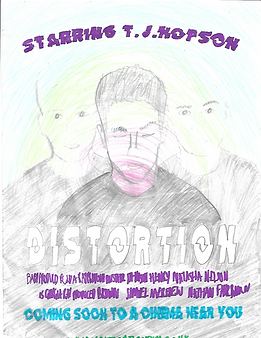
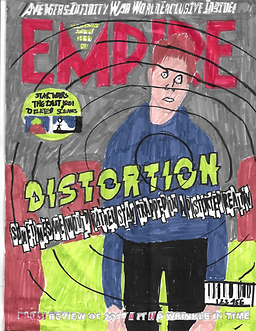
In conclusion, I used a variety of technologies whilst planning for my film trailer and ancillary tasks. This is due to the technology helping portray the blog posts easier for the reader and to help me discover ideas for my products. The technologies I used for planning includes Blogger, Pinterest, PowerPoint, AuthorStream and a scanner.